▶
▶


 ▶
▶Budget by Paycheck Complete Set
Plan the check. See the bills. Fund the goals. Pay the debt. Five files, one method.
5.0shop rating · 6 Etsy reviewsMost people who buy the Paycheck Budget come back for the bill calendar, or the sinking funds tracker, or the debt planner. This set is the whole method at once: plan each paycheck, see every bill coming, fund the goals, pay the debt down in order, and keep a steady paycheck when your income is not steady.
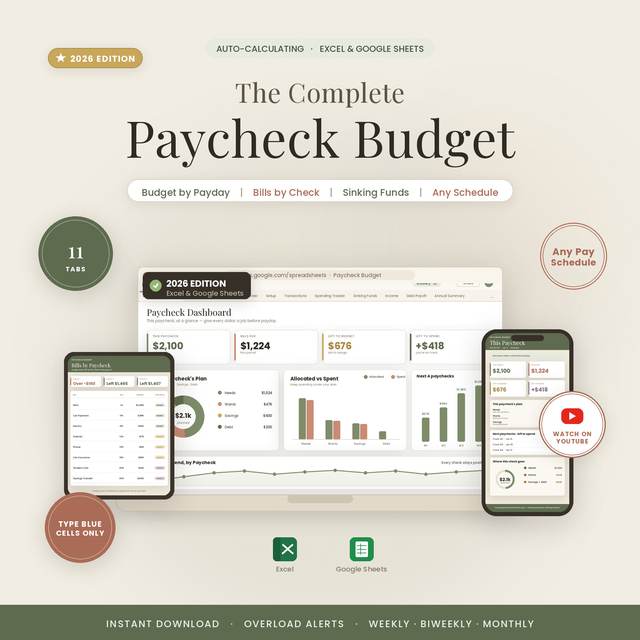
- The Paycheck Budget (12 tabs) with the Couples Edition for two incomes and alternating paydays
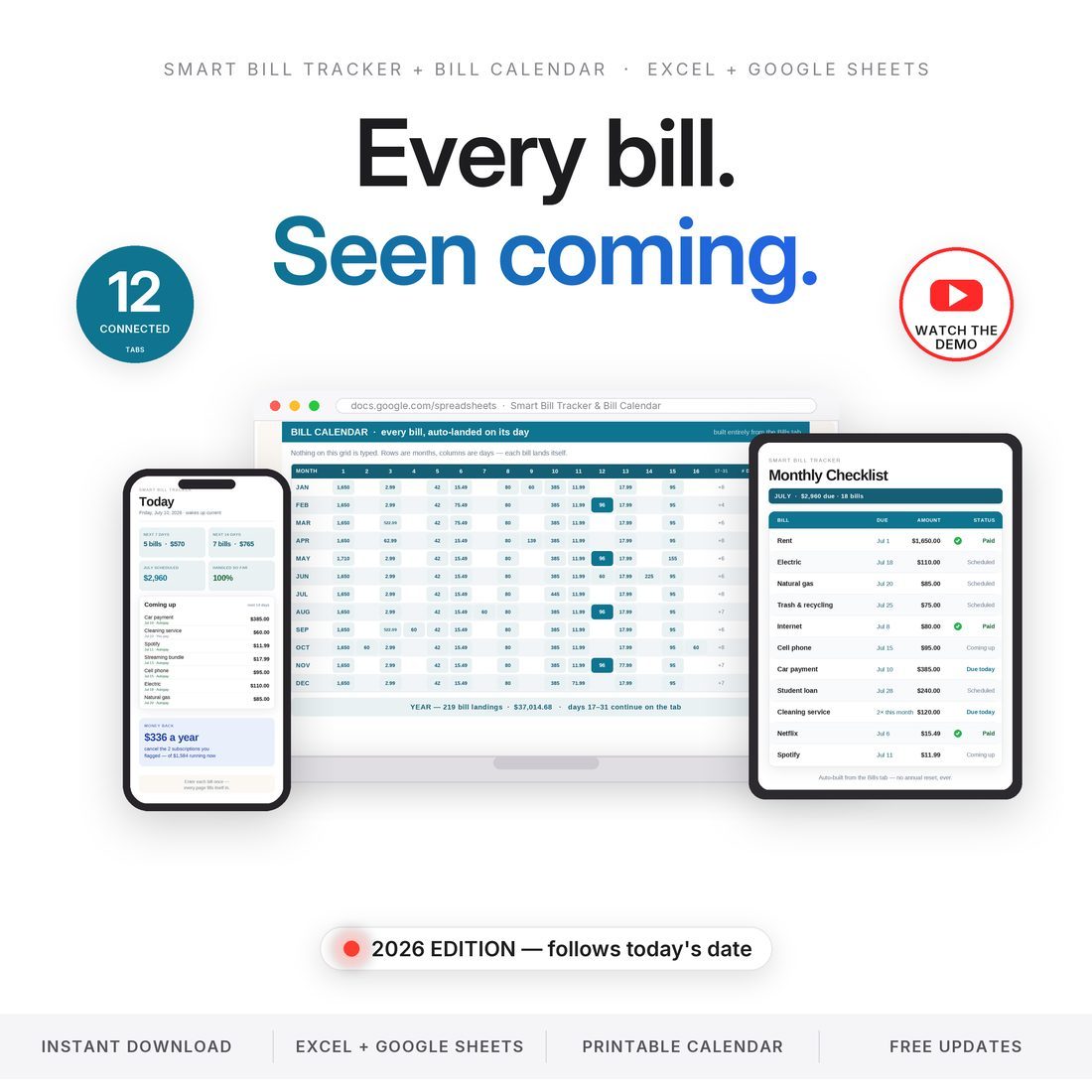
- The Smart Bill Tracker and Bill Calendar (12 tabs) with a printable one-page calendar
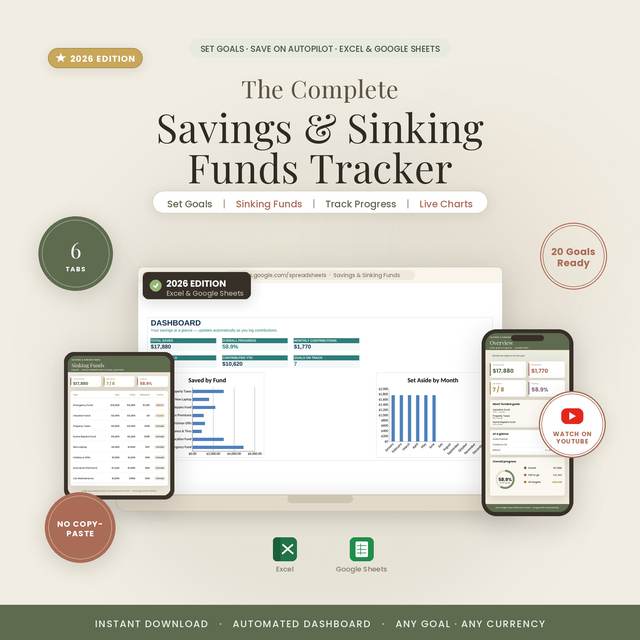
- The Savings and Sinking Funds Tracker (6 tabs) with a Needed-per-Month figure on every goal
- The Debt Snowball and Payoff Planner (6 tabs): snowball or avalanche, payoff date, interest saved
- The Irregular Income Budget (11 tabs) for freelance, tips, commission, gig and seasonal pay
Overview
Plan the check. See the bills. Fund the goals. Pay the debt. Five files, one method.
Most people who buy the Paycheck Budget come back for the bill calendar, or the sinking funds tracker, or the debt planner. This set is the whole method at once: plan each paycheck, see every bill coming, fund the goals, pay the debt down in order, and keep a steady paycheck when your income is not steady.
Five separate workbooks, each complete on its own and each sold separately in this store, each built the same way: you type only in the marked input cells and everything else calculates. In the shipped Paycheck Budget sample the current check is $2,100, $1,423 of bills are assigned to it, and the dashboard reads +$343 left to spend. The Bill Tracker sample finds $1,584 a year of subscriptions and $336 coming back from the two you flag. The Debt Snowball sample takes $31,730 of debt to a debt-free date 39 months out and saves $2,971 of interest against minimum payments.
What's Included
Five workbooks, 47 tabs between them, in one ZIP:
- One ZIP with five folders, one per product, and a START-HERE file that tells you which to open first
- 16 workbooks in all: each product in its shipped editions (Colorful, Light and Dark where a product ships them, plus the Couples Edition of the Paycheck Budget and an Editorial edition of the Irregular Income Budget)
- A printable one-page bill calendar (PDF) and a Quick-Start guide or README in every folder
- Worked samples in every workbook, so every tab has something in it until you replace it with your own numbers
- Links to the four narrated video tutorials (Paycheck Budget, Bill Tracker, Savings Tracker, Irregular Income)
Key Benefits
Why this one
Pick your pay schedule (weekly, biweekly, semi-monthly or monthly), assign every bill to the check that pays it, and the Paycheck Budget dashboard tells you what is left after this check's bills. In the sample that is +$343. The Pay Period Planner lays out all 26 paychecks of a biweekly year, one row per check, so the whole year is planned before it starts.
Enter each bill once with its frequency and anchor date, and the Bill Calendar places it on every due day for the year. Autopay is flagged Y or N beside every bill. The Subscriptions tab pulls every subscription out of your list and totals it, and the Late-Fee Math tab puts a number on staying ahead: $520 a year in the sample.
Each sinking fund gets a target, a target date and a Needed-per-Month figure, with an On Track, Behind or Funded status that flips as you log contributions. The sample carries eight goals, $17,880 saved, seven on track.
List every debt with its balance, APR and minimum. Choose snowball (smallest balance first) or avalanche (highest rate first) and the planner orders the payoff, builds the month-by-month plan and reports the debt-free date and the interest saved against minimum-only payments. Switch strategies any time and watch both numbers move.
The Irregular Income Budget has you set a monthly salary to pay yourself. The Buffer tab shows the good months funding the lean ones, the Lowest-Month Baseline shows the bills you must cover in your worst month, and the Tax Set-Aside parks a slice of every deposit. Sample: a $4,000 salary, a $2,400 baseline, a $12,600 buffer.
The workbooks are not linked to each other and do not need to be. They share one method and one rule: type only in the marked input cells. Learn it once in the Paycheck Budget and every other file in the set works the same way.
Who It's For
Built for
- Anyone paid weekly, biweekly, semi-monthly or monthly who wants each check planned before it arrives
- Couples running two incomes with alternating paydays
- Anyone paying down several debts who wants the order, the date and the interest saved worked out
- Freelancers, tipped and commissioned workers, and anyone whose income changes month to month
How It Works
Up and running in minutes
The START-HERE file says so. Pick your pay schedule and type your bills; the dashboard gives you the left-to-spend number for the current check.
Enter each bill once in the Bill Tracker and the calendar lands it on every due day of the year, with the subscription and late-fee tabs reading from the same list.
Type a target and a date for each sinking fund and read the Needed-per-Month figure and the status.
List balances, rates and minimums, pick snowball or avalanche, and read the debt-free date.
Set the salary you pay yourself, watch the buffer, and keep the worst month covered.
Why It's Different
Not another template
This is not a bundle assembled to hit a price. The five files are the products this store's own buyers keep pairing: the Paycheck Budget family draws over three hundred visits a month, and the carts left behind in it average about two products' worth. The set ships all five for a little under the price of three, with the same method and the same input-cell rule across every one, and every figure in the listing images was read from a real render of the shipped files.
Delivery & Compatibility
Instant, and it opens in what you already use
As soon as your order is complete you get instant access to download the ZIP: five folders, one per product, with a START-HERE file that tells you which to open first.
One ZIP, instant download, 16 workbooks in five product folders plus a printable one-page bill calendar (PDF) and Quick-Start guides. Portable formulas only — no macros, no add-ons, no account and nothing to cancel. Opens in Microsoft Excel (2016 or later, Mac or PC) and Google Sheets; to use Sheets, upload the .xlsx to Drive and open it with Sheets.
FAQ
Questions, answered
Do the five files link to each other?
No, and they do not need to. Each is its own complete workbook. They share one method and one rule, which is that you type only in the marked input cells. Start with the Paycheck Budget and open the others as you need them.
Will they work in Google Sheets?
Yes. Every formula is portable. Upload each .xlsx to Google Drive and open it with Sheets; formulas and dropdowns carry over.
I am paid weekly. Monthly. Twice a month.
Weekly, biweekly, semi-monthly and monthly schedules are built into the Paycheck Budget, and the bill calendar lands due dates against whichever one you pick.
We have two incomes.
The Couples Edition of the Paycheck Budget is in the box, pre-set for two earners with alternating paydays.
For personal use. A budgeting and record-keeping tool that calculates from the numbers you enter; not financial, tax or accounting advice. Tax set-aside percentages in the Irregular Income Budget are estimates — confirm your own rate with a professional. Every workbook ships with a worked sample; delete the sample rows and type your own.